
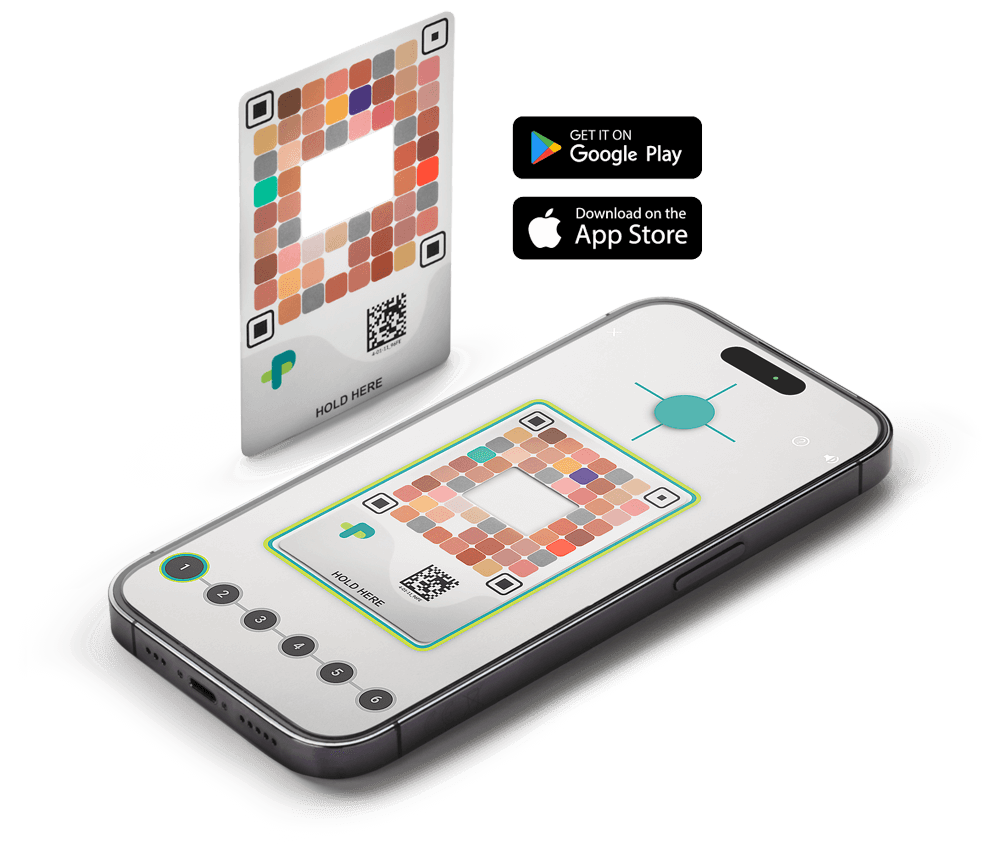
Picterus® Jaundice Pro is a smartphone-based medical device for quick, accurate, and non-invasive jaundice screening in newborns.
Jaundice@Home is a premium feature that lets healthcare professionals monitor jaundice remotely through secure data sharing with parents.
Newborn jaundice can lead to serious complications if not detected early. Picterus makes screening simple and safe. It is quick, accurate, and non-invasive. This helps healthcare professionals act fast and gives parents peace of mind.
The Picterus® solution is unique because it combines accuracy with convenience. It uses a smartphone and an advanced image analysis instead of costly equipment or invasive tests. Jaundice@Home adds remote monitoring, so care continues after discharge. This approach saves time, reduces hospital visits, and improves workflows – benefits most other solutions don’t offer.
Picterus® Jaundice Pro has undergone extensive testing in multiple clinical studies and Picterus results have shown reliable correlation to blood tests. Picterus® Jaundice Pro has a better performance than visual assessment to identify newborns with significant jaundice who require a blood test to determine total serum bilirubin (TSB).
Picterus fits seamlessly into the newborn care workflow:
Picterus adapts to your environment, and you can get started quickly without complex installations. It works seamlessly across diverse healthcare settings and requires only minimal equipment to start: a smartphone, internet-connected computer, and calibration cards. If your workflow requires integration with existing patient journal systems, this can be requested individually.
Picterus® Jaundice Pro and Jaundice@Home optimize resource use, support continuity of care from hospital to home, and enhance patient satisfaction: All without major changes to existing workflows. Picterus solutions help healthcare facilities improve efficiency and quality of care. With fast, non-invasive screening and remote monitoring, staff can detect jaundice early, reduce unnecessary blood tests, and lower readmission rates.
Picterus products are developed at Picterus AS headquarters in Trondheim, Norway, under ISO 13485 and EU MDR 2017/745 certified processes.
Calibration Cards are produced using specialized printing equipment in Germany and stored at controlled facilities in the Netherlands from where they are shipped all over the world.
The servers are primarily located in Belgium and operated by a certified cloud service provider. Where required by local regulations, data is also hosted on servers located within specific countries to ensure compliance with local applicable laws. Regardless of location, all servers are fully controlled and managed by Picterus. The servers that process image analysis and bilirubin calculations for Picterus® Jaundice Pro and Jaundice@Home are hosted in secure environments with TLS encryption and strict healthcare data protection measures and are managed by Picterus AS in compliance with GDPR and industry standards for medical data security.
This structure guarantees strict quality control while supporting worldwide availability of Picterus solutions.
Picterus® Jaundice Pro is a jaundice screening device approved for clinical use by healthcare professionals and caregivers of newborns (e.g. parents).
Only use the app on newborns who:
Do NOT use the app on newborns with:
Additionally, do NOT use the device for monitoring newborns at high risk for rapidly rising bilirubin levels due to confirmed or suspected underlying conditions, including but not limited to:
Download Picterus® Jaundice Pro from Google Play (android) or App Store (iOS) on your mobile phone. Follow the instructions as stated in Google Play and App Store.
If you have been invited to download Picterus® Jaundice Pro through an Organization, scan the QR code or follow the instructions provided in the email.
Picterus® Jaundice Pro is compatible with all phones that have not previously reported any problems. If you attempt to use the app on a phone with known issues identified by Picterus AS, an error will be reported.
For an updated list of compatible devices and known issues, click here.
The minimum hardware and software requirements for smartphones compatible with Picterus® Jaundice Pro:
Android Smartphone Minimum Requirements
Apple iPhone Minimum Requirements
Yes, to use Picterus® Jaundice Pro, a stable internet connection is required to perform a scan and generate results. The amount of data transmitted is very low, making it suitable even for limited bandwidth environments.
For further details consult the Instructions for Use which can be found on our website or through the app.
No. Picterus® Jaundice Pro app will be provided as a single version, and no other versions or configurations will be made available for purchase or use on the market. The app is designed to automatically download and install updates when they become available.
Picterus® Jaundice Pro has evolved over time. Earlier versions of the app relied on previous generations of the analysis model and had certain limitations.
These older versions are no longer active or accessible to users. Anyone downloading or updating the app today receives only the current version and its latest approved model. However, awareness of earlier versions is still relevant when interpreting scientific literature. Published studies may report performance metrics, validation results, or clinical outcomes based on those earlier versions. As a result, some findings in the literature may differ from the capabilities of the app as it exists today.
For detailed information about performance, intended use, and limitations, please refer to the current Instructions for Use (IFU).
You will always have access to the latest version of the app. The app is designed to automatically download and install updates when they become available. This process will occur without the need for manual intervention ensuring that all users are always using the most up-to-date version of the app. This approach guarantees that any critical updates such as security patches, bug fixes, performance improvements, and new features will be immediately available to users, contributing to the continued safety, performance, and regulatory compliance of the device.
In most cases, this update process happens automatically through your device’s official app store, provided that automatic updates are enabled and the app has been installed from an approved source (App Store or Google Play). However, update behaviour may vary depending on individual device settings, network availability, and user preferences. For this reason, users can also verify and manage updates manually if needed.
To manually check and update:
In order to use Picterus® Jaundice Pro you need to purchase Picterus Scans or have a subscription plan through an Organization. A successful scan with the Picterus® Jaundice Pro app means that enough images pass the app’s quality check for the result to be determined.
Each time you complete a successful scan, one is deducted from your balance. You can add more scans to your profile by purchasing them from your local distributor, contacting your Organization Admin, or by contacting contact@picterus.com.
Follow these steps:
Note: if you have multiple Picterus user accounts, or belong to multiple organizations, verify that the correct Picterus account is signed in to before scanning the QR code.
Note: Please make sure not to use a VPN connection.
For a step-by-step explanation please watch this tutorial.
A successful scan means that the app displays a bilirubin result. If the app shows an error message (such as “scan failed”) and does not provide a result, the scan was not successful and should be repeated.
To help ensure a successful scan, follow these steps:
Yes, pictures must only be taken on the infant’s chest, as shown in the Instructions for Use. The skin must be clean, undamaged, and dry. The skin must not have been lubricated with moisturizing cream, oil, etc. The skin must not be affected by any skin condition or disease other than jaundice.
For the best results, please refer to the Instructions for Use and consider the following practical tips:
For the best user experience, the app should be used in bright, even, white indoor lighting. Natural light (not direct sunlight) also works very well.
The most important factor is that the lighting is even. Shadows, uneven illumination, or strong highlights—such as sunlight falling directly on part of the card—should be avoided. Strongly coloured or dim decorative lighting can also cause issues, as the app may struggle to recognise the calibration card or accurately capture skin colour under those conditions.
The calibration card is designed to adjust for normal differences in light sources, and extensive testing with LED, halogen, and fluorescent lights at various colour temperatures has shown no meaningful differences in performance under typical white indoor lighting.
If a scan fails and an error message is shown, repeat the scan.
Scans may fail if the app’s built-in quality check rejects the images to ensure accurate results. This can happen due to poor image quality, such as low lighting, or if the calibration card is damaged or dirty. If you receive a failure message, try again by turning on an extra light or moving the newborn to a brighter area. Ensure your camera lens is clean and avoid shadows during the scan. You can also check our FAQ under “Do you have tips for doing a scan?” or watch our tutorial video “Tips & Tricks for Scans”.
If the scan continues to fail after repeating the procedure and following the instructions above, please contact Picterus support at contact@picterus.com for further assistance.
No, the flash is not harmful. No undesirable side effects have been reported in the relevant literature or found in the clinical studies of Picterus® Jaundice Pro, which involves using a smartphone (with a flash) to capture images of the newborn’s skin.
As stated in the instructions for use, the camera should be positioned to point towards the chest, ensuring that the flash is not directed at the newborn’s eyes. This approach has been shown to be safe.
The Picterus® Jaundice Pro app only takes images of a small part of the skin from the newborn’s chest, and the images should contain no identifiable information. In addition, some personal information about the newborn may be requested by the Picterus® Jaundice Pro for the calculation of the bilirubin value:
For users of our application, Picterus AS stores the email address linked to the user account for authentication purposes, which is required for performing scans using Picterus® Jaundice Pro.
Data are stored securely on cloud servers in EU and are subsequently anonymized to ensure that no personal information remains associated with the user account or device. Additionally, we use Transport Layer Security (TLS) to encrypt the data during transmission, keeping it safe at all times. Newborn profiles and all related data are also deleted from the device and the user account in accordance with the terms specified in the Picterus AS Privacy Policy.
Please note that the application does not automatically log out or close after displaying a result. If the mobile device remains unlocked and the application is running, results will stay visible. To ensure data security and prevent unauthorized access, users should: 1) log out after use, 2) lock the mobile device, 3) follow institutional security and data protection protocols where applicable
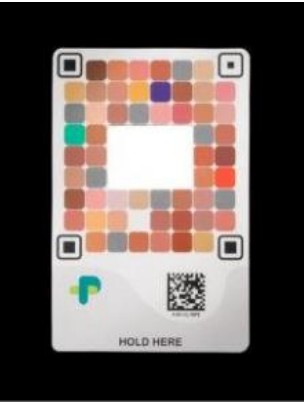
The image below is an example of what Picterus AS is using when scans are made. The background of the image is blacked out, only the Picterus® Calibration Card and the imaging window are retained. As shown in the sample below, the app only processes anonymous calibration data for functionality. Personal photos are not retained.
For further details, please read the Picterus AS Privacy Policy.
If you’re experiencing memory issues when using the Picterus® Jaundice Pro app, try the following steps:
If the issue persists, reach out to contact@picterus.com for further assistance.
For general questions, please contact Picterus AS at contact@picterus.com.
Please seek medical advice from a healthcare professional. Picterus® Jaundice Pro results should not be used for diagnosis. It does not replace the need for follow-up by healthcare professionals. Healthcare professionals shall perform actions according to clinical guidelines for follow-up and treatment of neonatal jaundice. Moreover, do not rely solely on the results and always consider the baby’s overall condition.
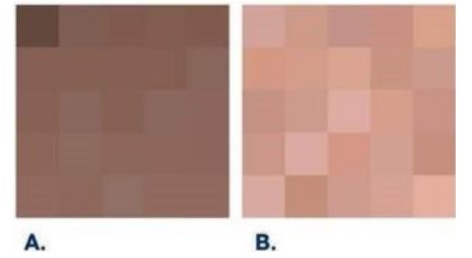
Picterus® Jaundice Pro results are automatically classified as either Group A or Group B during image analysis. Clinical trial data showed that some results have higher uncertainty for certain newborns. These newborns share specific skin characteristics, so we created two groups:
Group A – Results with greater uncertainty
Group B – Results with lower uncertainty
If a newborn’s skin characteristics are close to the threshold between Groups A and B, the group assignment may change across repeated scans. This is normal and expected. Despite a greater uncertainty, Group A results show a high sensitivity overall.
The images below show examples of skin tones for each group.
The assigned group is displayed on the result screen for every scan.
Picterus® Jaundice Pro is a non-invasive tool designed to screen newborns for signs of jaundice, without needing a blood sample. It works by analyzing the color of your baby’s skin to estimate bilirubin levels — the substance that causes jaundice. Since it’s an estimate, it might not match the exact number from a blood test, which measures bilirubin directly from the baby’s blood.
There are a few reasons for the difference:
While Picterus® Jaundice Pro might not be as exact as a blood test, it’s a reliable first step in making sure newborns get the care they need.
Picterus® Jaundice Pro is designed to provide reliable and accurate estimates of bilirubin levels, but slight variations are common with all non-invasive screening tools. These can occur due to several factors:
Despite these factors, Picterus® Jaundice Pro is validated to provide clinically useful estimates, and small differences between scans should generally be within acceptable limits. Picterus® Jaundice Pro is designed to support clinical judgment, not replace it. For clinical decisions, it’s recommended to consider trends over time and, when needed, confirm with a laboratory test.
Yes, the Picterus® Calibration Card can be used multiple times on the same newborn. Please note that due to hygienic reasons, the Picterus® Calibration Card should only be used on a single newborn. Only together with the Picterus Card Holder and correct handling, the calibration card can be used on multiple newborns
Order Picterus® Calibration Cards and Scans on our website’s “Order Here” page or through a local distributor. Select your country for details. How do I get in contact when I have further questions?
Jaundice@Home is a software solution designed for healthcare professionals to remotely monitor and assess neonatal jaundice. By utilizing results from Picterus® Jaundice Pro, it enables real-time data sharing between parents and clinicians, supporting early detection and timely follow-up from home.
The Jaundice@Home platform extends the capabilities of Picterus® Jaundice Pro, enabling healthcare professionals to remotely manage neonatal jaundice with ease and confidence.
The platform allows users to visualize and track bilirubin results from Picterus® Jaundice Pro, as well as manually enter TcB and TSB values. These results are displayed on a graph that incorporates treatment thresholds based on international medical guidelines for jaundice management. The platform supports longitudinal tracking by displaying multiple results for individual patients on the same graph and provides healthcare professionals with remote access to Picterus® Jaundice Pro data for clinical assessment.
Health care professionals can also request new scans to be performed directly through the platform. Parents/caregivers receive notifications, ensuring timely follow-up and accurate monitoring when bilirubin levels need to be reassessed.
The platform bridges the gap between home and clinic, making jaundice management more accessible, timely, and efficient.
Jaundice@Home is accessed via www.jaundicehome.com using your Picterus account.
To have access, you need to be a member of an Organization. Organizations can be set-up by contacting Picterus at contact@picterus.com or your local distributor. Organization membership can also be granted by Organization Administrators.
For instructions to use the Jaundice@Home platform, please read the IFU before use. Access the IFU from the Picterus website, look for the section “Other Instructions for use”: https://picterus.com/user-regulatory-documents/
There are two versions of the IFU – one for Organization Administrators and one for Healthcare Professionals.
For Jaundice@Home tutorial videos for both Administrators and Healthcare Professionals, visit our YouTube channel.
Neonatal jaundice, or hyperbilirubinemia, occurs when a newborn’s blood contains high levels of bilirubin, a yellow substance produced from the breakdown of haemoglobin in red blood cells.
Adults generate about 2.4 million red blood cells every second, producing a substantial amount of bilirubin. The liver processes and removes this bilirubin from the body. In adults, some bilirubin in the blood is normal and not harmful due to lower levels and a fully developed blood-brain barrier preventing bilirubin from entering the brain.
In newborns, however, the situation is completely different. In the womb, fetuses use a special kind of haemoglobin (fetal haemoglobin) to extract oxygen from the mother’s blood efficiently. This fetal haemoglobin becomes unnecessary after birth when the baby starts breathing independently. Consequently, the baby’s body rapidly breaks down red blood cells to replace fetal haemoglobin with adult haemoglobin, increasing bilirubin production. However, since the liver is not fully developed in some newborns, their ability to process bilirubin is limited. The blood-brain barrier might also be underdeveloped, allowing bilirubin to enter the brain, which can be harmful.
While neonatal jaundice is a common and usually temporary condition in newborns, affecting 60 to 80% of them (84 to 112 million cases annually worldwide), it typically appears within 48 to 72 hours after birth and resolves within 3 to 7 days. However, about one in ten newborns affected by jaundice may develop significant jaundice, necessitating close monitoring and treatment. Failure to detect and manage high bilirubin levels can lead to brain damage or even death, as excessive bilirubin might cross the underdeveloped blood-brain barrier.
In order to use Picterus® Jaundice Pro you need to purchase Picterus Scans or have a subscription plan through an Organization. A successful scan with the Picterus® Jaundice Pro app means that enough images pass the app’s quality check for the result to be determined.
Each time you complete a successful scan, one is deducted from your balance. You can add more scans to your profile by purchasing them from your local distributor, contacting your Organization Admin, or by contacting contact@picterus.com.
Follow these steps:
Note: if you have multiple Picterus user accounts, or belong to multiple organizations, verify that the correct Picterus account is signed in to before scanning the QR code.
Note: Please make sure not to use a VPN connection.
For a step-by-step explanation please watch this tutorial.
A successful scan means that the app displays a bilirubin result. If the app shows an error message (such as “scan failed”) and does not provide a result, the scan was not successful and should be repeated.
To help ensure a successful scan, follow these steps:
Yes, pictures must only be taken on the infant’s chest, as shown in the Instructions for Use. The skin must be clean, undamaged, and dry. The skin must not have been lubricated with moisturizing cream, oil, etc. The skin must not be affected by any skin condition or disease other than jaundice.
For the best results, please refer to the Instructions for Use and consider the following practical tips:
For the best user experience, the app should be used in bright, even, white indoor lighting. Natural light (not direct sunlight) also works very well.
The most important factor is that the lighting is even. Shadows, uneven illumination, or strong highlights—such as sunlight falling directly on part of the card—should be avoided. Strongly coloured or dim decorative lighting can also cause issues, as the app may struggle to recognise the calibration card or accurately capture skin colour under those conditions.
The calibration card is designed to adjust for normal differences in light sources, and extensive testing with LED, halogen, and fluorescent lights at various colour temperatures has shown no meaningful differences in performance under typical white indoor lighting.
If a scan fails and an error message is shown, repeat the scan.
Scans may fail if the app’s built-in quality check rejects the images to ensure accurate results. This can happen due to poor image quality, such as low lighting, or if the calibration card is damaged or dirty. If you receive a failure message, try again by turning on an extra light or moving the newborn to a brighter area. Ensure your camera lens is clean and avoid shadows during the scan. You can also check our FAQ under “Do you have tips for doing a scan?” or watch our tutorial video “Tips & Tricks for Scans”.
If the scan continues to fail after repeating the procedure and following the instructions above, please contact Picterus support at contact@picterus.com for further assistance.
No, the flash is not harmful. No undesirable side effects have been reported in the relevant literature or found in the clinical studies of Picterus® Jaundice Pro, which involves using a smartphone (with a flash) to capture images of the newborn’s skin.
As stated in the instructions for use, the camera should be positioned to point towards the chest, ensuring that the flash is not directed at the newborn’s eyes. This approach has been shown to be safe.
The Picterus® Jaundice Pro app only takes images of a small part of the skin from the newborn’s chest, and the images should contain no identifiable information. In addition, some personal information about the newborn may be requested by the Picterus® Jaundice Pro for the calculation of the bilirubin value:
For users of our application, Picterus AS stores the email address linked to the user account for authentication purposes, which is required for performing scans using Picterus® Jaundice Pro.
Data are stored securely on cloud servers in EU and are subsequently anonymized to ensure that no personal information remains associated with the user account or device. Additionally, we use Transport Layer Security (TLS) to encrypt the data during transmission, keeping it safe at all times. Newborn profiles and all related data are also deleted from the device and the user account in accordance with the terms specified in the Picterus AS Privacy Policy.
Please note that the application does not automatically log out or close after displaying a result. If the mobile device remains unlocked and the application is running, results will stay visible. To ensure data security and prevent unauthorized access, users should: 1) log out after use, 2) lock the mobile device, 3) follow institutional security and data protection protocols where applicable
The image below is an example of what Picterus AS is using when scans are made. The background of the image is blacked out, only the Picterus® Calibration Card and the imaging window are retained. As shown in the sample below, the app only processes anonymous calibration data for functionality. Personal photos are not retained.
For further details, please read the Picterus AS Privacy Policy.
If you’re experiencing memory issues when using the Picterus® Jaundice Pro app, try the following steps:
If the issue persists, reach out to contact@picterus.com for further assistance.
For general questions, please contact Picterus AS at contact@picterus.com.
Please seek medical advice from a healthcare professional. Picterus® Jaundice Pro results should not be used for diagnosis. It does not replace the need for follow-up by healthcare professionals. Healthcare professionals shall perform actions according to clinical guidelines for follow-up and treatment of neonatal jaundice. Moreover, do not rely solely on the results and always consider the baby’s overall condition.
Picterus® Jaundice Pro results are automatically classified as either Group A or Group B during image analysis. Clinical trial data showed that some results have higher uncertainty for certain newborns. These newborns share specific skin characteristics, so we created two groups:
Group A – Results with greater uncertainty
Group B – Results with lower uncertainty
If a newborn’s skin characteristics are close to the threshold between Groups A and B, the group assignment may change across repeated scans. This is normal and expected. Despite a greater uncertainty, Group A results show a high sensitivity overall.
The images below show examples of skin tones for each group.
The assigned group is displayed on the result screen for every scan.
Picterus® Jaundice Pro is a non-invasive tool designed to screen newborns for signs of jaundice, without needing a blood sample. It works by analyzing the color of your baby’s skin to estimate bilirubin levels — the substance that causes jaundice. Since it’s an estimate, it might not match the exact number from a blood test, which measures bilirubin directly from the baby’s blood.
There are a few reasons for the difference:
While Picterus® Jaundice Pro might not be as exact as a blood test, it’s a reliable first step in making sure newborns get the care they need.
Picterus® Jaundice Pro is designed to provide reliable and accurate estimates of bilirubin levels, but slight variations are common with all non-invasive screening tools. These can occur due to several factors:
Despite these factors, Picterus® Jaundice Pro is validated to provide clinically useful estimates, and small differences between scans should generally be within acceptable limits. Picterus® Jaundice Pro is designed to support clinical judgment, not replace it. For clinical decisions, it’s recommended to consider trends over time and, when needed, confirm with a laboratory test.